
Monetize
optional pay-per-read.
Let x402-capable AI agents pay per article in USDC, straight to your own wallet. Off by default. Few agents pay today: treat it as an extra, not a revenue plan.
01Turning it on
CryptoMeter → Monetize: "Optional: let x402-capable AI agents pay per article in USDC, straight to your own wallet. Few agents pay today — treat it as an extra, not a revenue plan." Everything else in CryptoMeter works without it.
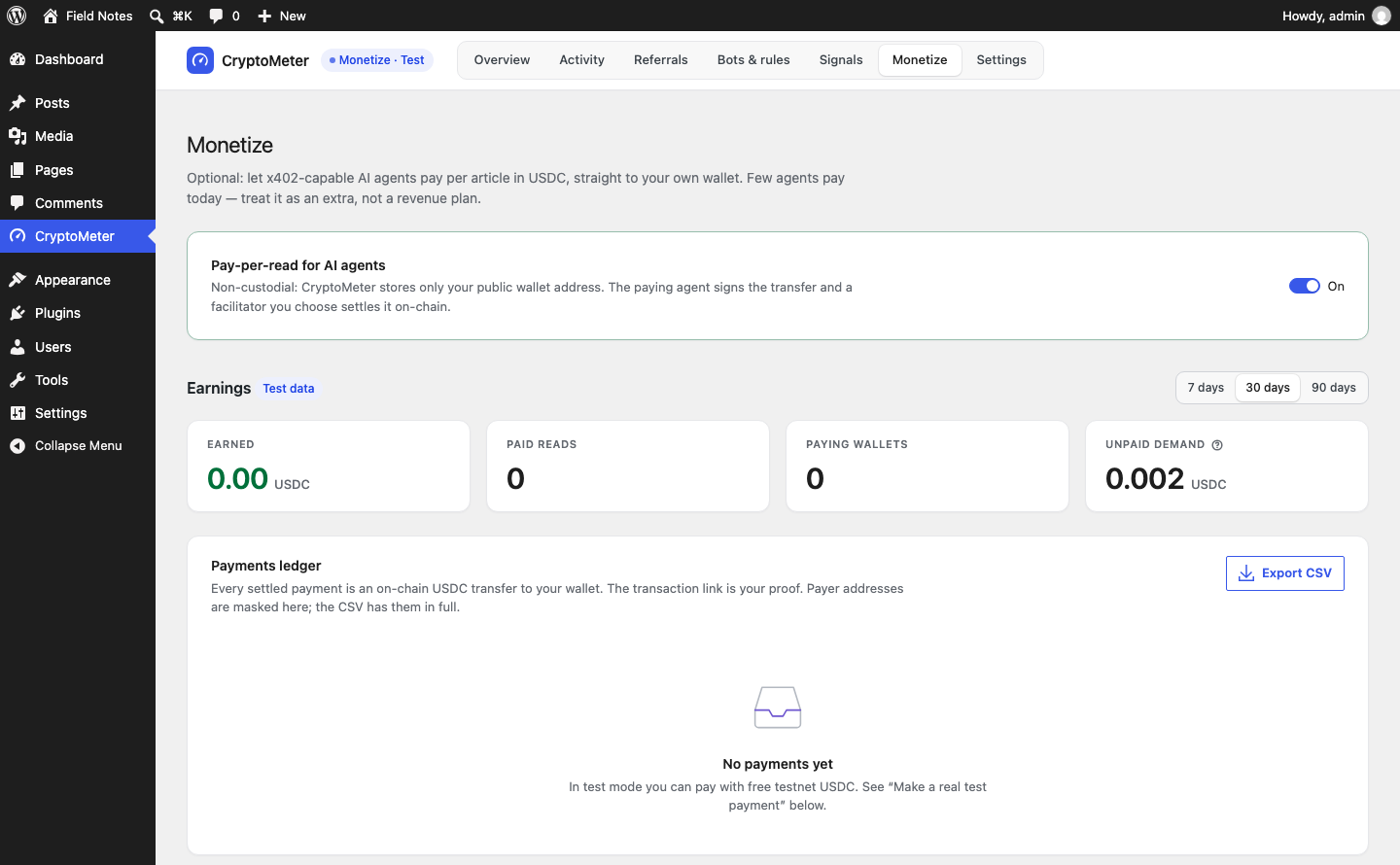
- Switch Pay-per-read for AI agents on.
- Enter your wallet under Payments and save. Until a valid wallet is saved, bots set to Charge are let through and counted as unpaid demand.
- Choose which bots pay: on Bots & rules set an intent or a bot to Charge, or apply the preset Charge training and agents.
- Stay in Test mode and use the Simulator first.
CryptoMeter stores only your public wallet address. The paying agent signs the transfer and a facilitator you choose settles it on-chain. CryptoMeter never asks for a private key or seed phrase; anyone asking you for one "to set up CryptoMeter" is a scammer.
Switching Monetize off makes Charge behave like Allow again (logged as "Allowed"). Your wallet, prices and ledger are kept.
02Payments
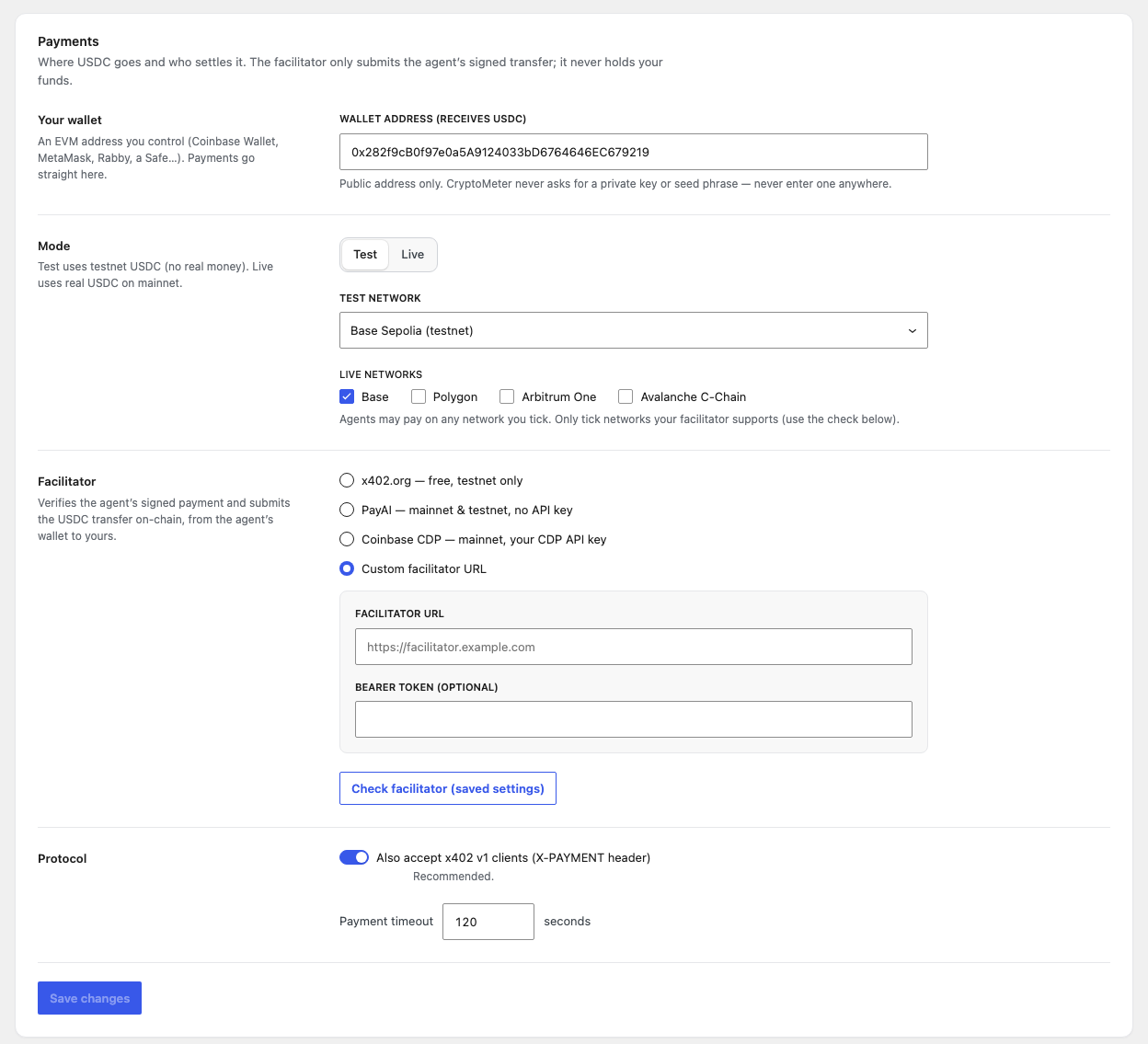
| Field | What it does | Default |
|---|---|---|
Wallet address (receives USDC) pay_to | Your public EVM address (0x + 40 hex characters). Payments go straight here. An invalid address is not saved. | empty |
Mode mode | Test: testnet USDC, no real money. Live: real USDC on mainnet. Payments and traffic counters are recorded per mode. | Test |
Test network network_test | Base Sepolia, Polygon Amoy, Arbitrum Sepolia or Avalanche Fuji. | Base Sepolia |
Live networks networks_live | Base, Polygon, Arbitrum One, Avalanche C-Chain. Agents may pay on any network you tick. Only tick networks your facilitator supports. If none is ticked, Base is used. | Base |
Facilitator facilitator | x402.org — free, testnet only · PayAI — mainnet & testnet, no API key · Coinbase CDP — mainnet, your CDP API key · Custom facilitator URL. Choosing Live with x402.org switches to PayAI automatically, with a notice. | x402.org |
| Facilitator URL, Bearer token (optional) | Custom only. The URL must be https:// (plain http only for localhost, 127.0.0.1, ::1). The token is sent as Authorization: Bearer … and never shown again ("Saved — type to replace"). | empty |
| CDP API key ID, CDP API key secret | Coinbase CDP only. Replaced by "CDP credentials are defined in wp-config.php." when the constants are set. | empty |
| Check facilitator (saved settings) | Tests the saved settings (save first). Shows "Facilitator reachable" / "Facilitator not reachable", "API key accepted" / "API key rejected" (CDP), "This facilitator is testnet-only. Choose another one for live mode.", and per network: supported, not supported by this facilitator, or unknown. | - |
Also accept x402 v1 clients (X-PAYMENT header) legacy_v1 | Accept the older v1 header and send a v1-shaped body next to the v2 header. Recommended. | On |
Payment timeout max_timeout | Seconds a signed payment may take (sent as maxTimeoutSeconds). 30-600. | 120 |
03Pricing and per-post prices
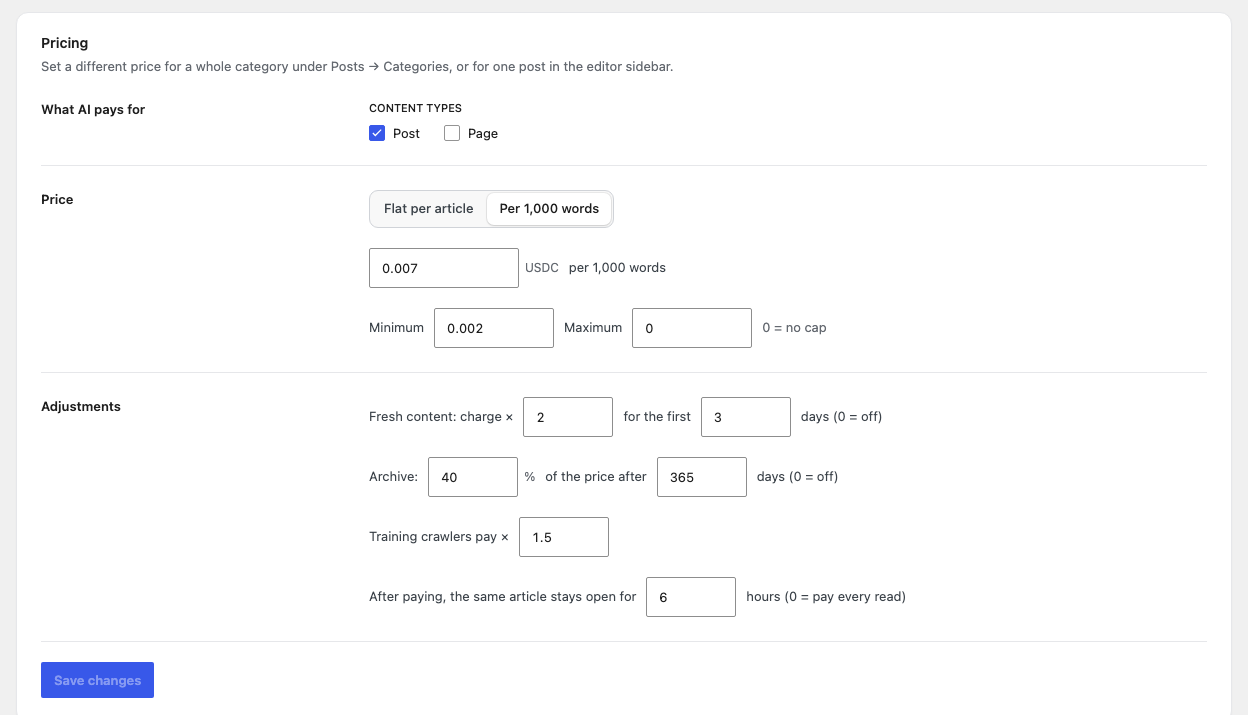
| Field | What it does | Default |
|---|---|---|
Content types post_types | Which public post types are metered (published, not password-protected). This also decides where the editor box, the per-post "Blocked" option and the core REST API guard apply. | Post |
| Flat per article / Per 1,000 words | Pricing model. | Flat |
| Price per article / Price per 1,000 words | USDC, 0-100. | 0.01 / 0.005 |
| Minimum, Maximum | Computed prices are raised to the minimum or capped at the maximum (0 = no cap). Per-post custom prices are not clamped. | 0.001 / 1.00 |
| Fresh content: charge × … for the first … days | Premium for new posts. 0 days = off. | × 2, off |
| Archive: … % of the price after … days | Discount for old posts. 0 days = off. Skipped when the post is fresh. | 50 %, off |
| Training crawlers pay × | Extra multiplier for AI training bots. | × 1 |
| After paying, the same article stays open for … hours | Access window (0 = pay every read, max 8760). | 24 |
Price calculation order
- Per-post setting (editor): Read for free → 0; Blocked → 403; custom price → used as-is.
- Category price: the highest CryptoMeter price among the post's categories.
- Otherwise the site model (flat, or words ÷ 1,000 × price per 1,000 words).
- Fresh premium or archive price (only one).
- Training multiplier for AI training bots.
- Minimum / maximum.
- The
cryptometer_pricefilter has the final say.
Per post and per category
- Editor box "CryptoMeter · AI access" (sidebar of metered post types), "AI bots reading this post": Pay site price (default), Pay a custom price (Price per read (USDC)), Read for free, Blocked. Blocked works with or without Monetize: AI bots get HTTP 403 for that post; humans and search engines are unaffected. The box shows the current price and, once there are payments, "Earned $X from N paid AI reads".
- Posts list: an "AI price" column (a price, Free or Blocked).
- Posts → Categories: field AI price per read (USDC) overrides the site price for posts in that category. Only the standard Categories taxonomy has it.
04The HTTP 402 flow
For developers and the curious. You do not need this to use the plugin.
- Challenge. A bot set to Charge requests a metered post and gets HTTP 402 Payment Required with a
PAYMENT-REQUIREDheader (x402 v2, base64 JSON: resource plus oneacceptsentry per active network withscheme: "exact", CAIP-2 network, amount in atomic units, USDC contract,payTo,maxTimeoutSeconds, token name/version), a JSON body (v1 shape when v1 is accepted) with acryptometerobject (title, teaser, price, networks, message), andLink: </llms.txt>; rel="describedby". Verified on a test install: GPTBot with the Charge preset got 402,x-cryptometer: challenge, amount10000(0.01 USDC) onbase-sepolia. - Pay. The agent signs a USDC
TransferWithAuthorization(EIP-3009) for exactly that amount to your address and retries withPAYMENT-SIGNATURE(v2) orX-PAYMENT(v1). - Check and settle. CryptoMeter checks locally (decoding, version, network, exact amount, token, recipient, validity window, unused nonce), throttles failed attempts (10 per IP per minute), calls the facilitator's
/verify, reserves the nonce (replay protection) and calls/settle(one retry on "pending"). - Deliver. HTTP 200 with
PAYMENT-RESPONSE(v1:X-PAYMENT-RESPONSE) and the article as HTML, Markdown or JSON (see What paying agents receive). With an access window:X-CryptoMeter-Access(access pass) andX-CryptoMeter-Access-Expires.
Every non-search response CryptoMeter changes carries Cache-Control: no-store, private, max-age=0, Vary: User-Agent, Accept, PAYMENT-SIGNATURE, X-PAYMENT, the X-CryptoMeter decision header and the DONOTCACHEPAGE constant.
Whoever holds it can re-open that one article until it expires. Set the access window to 0 to charge every read. To invalidate all passes: wp option delete cryptometer_secret (a new secret is created automatically).
Back doors. With Monetize set up and "Show bots set to Charge only excerpts in RSS feeds and the REST API" on, charged bots see excerpts only in feeds, archive/home/search pages and /wp-json/wp/v2/… for metered post types.
05Networks and facilitators
| Network | CAIP-2 id | v1 name | USDC contract |
|---|---|---|---|
| Base | eip155:8453 | base | 0x833589fCD6eDb6E08f4c7C32D4f71b54bdA02913 |
| Base Sepolia (testnet) | eip155:84532 | base-sepolia | 0x036CbD53842c5426634e7929541eC2318f3dCF7e |
| Polygon | eip155:137 | polygon | 0x3c499c542cEF5E3811e1192ce70d8cC03d5c3359 |
| Polygon Amoy (testnet) | eip155:80002 | polygon-amoy | 0x41E94Eb019C0762f9Bfcf9Fb1E58725BfB0e7582 |
| Arbitrum One | eip155:42161 | (none) | 0xaf88d065e77c8cC2239327C5EDb3A432268e5831 |
| Arbitrum Sepolia (testnet) | eip155:421614 | (none) | 0x75faf114eafb1BDbe2F0316DF893fd58CE46AA4d |
| Avalanche C-Chain | eip155:43114 | avalanche | 0xB97EF9Ef8734C71904D8002F8b6Bc66Dd9c48a6E |
| Avalanche Fuji (testnet) | eip155:43113 | avalanche-fuji | 0x5425890298aed601595a70AB815c96711a31Bc65 |
| Facilitator | URL | Mode | Key |
|---|---|---|---|
| x402.org | https://x402.org/facilitator | Test only | none |
| PayAI | https://facilitator.payai.network | Test and live | none |
| Coinbase CDP | https://api.cdp.coinbase.com/platform/v2/x402 | Live | your CDP key |
| Custom | your URL (/verify, /settle, /supported under it) | Test and live | optional bearer token |
Facilitators are independent third parties with their own terms, availability and possible fees. CryptoMeter does not operate one and takes no fee. Trust your facilitator: CryptoMeter checks amount, recipient, network, expiry and replay itself, but relies on the facilitator for signature validity and settlement.
Coinbase CDP key in wp-config.php (recommended)
// Ed25519 key (one line)
define( 'CRYPTOMETER_CDP_KEY_ID', 'your-cdp-key-id' );
define( 'CRYPTOMETER_CDP_KEY_SECRET', 'your-base64-ed25519-secret' );

// or an EC (PEM) key: keep the line breaks as \n inside double quotes
define( 'CRYPTOMETER_CDP_KEY_SECRET', "-----BEGIN EC PRIVATE KEY-----\nLINE1\nLINE2\n-----END EC PRIVATE KEY-----\n" );
Create the key at portal.cdp.coinbase.com. Ed25519 needs the PHP sodium extension; PEM (ES256) needs openssl. A CDP API key lets your site call the facilitator; it cannot move funds from your receiving wallet. Keep it secret anyway.
06Test payment and demo client
The Monetize card Make a real test payment summarises this. tools/pay-demo.mjs is a small Node.js x402 client; WordPress never loads it.
The demo needs a private key to sign. Never use the key of a wallet that holds real funds, and never your receiving wallet's key. CryptoMeter itself never needs a private key.
- On a staging copy: Monetize on, Test mode, Base Sepolia, x402.org, your receiving wallet saved, and the test bot set to Charge (the Simulator must show 402 for GPTBot). Do not send a login cookie: logged-in users are never charged.
- Install Node.js (a current LTS; the demo was verified with Node.js 22). Copy the plugin's
toolsfolder to your computer and runnpm installinside it (installs viem). - Dry run with a random, empty wallet:
node pay-demo.mjs https://staging.example.com/some-post/. Expected: a 402, then a retry answered with the facilitator errorinvalid_exact_evm_insufficient_balance(the random wallet has no USDC). That proves the chain works. - Create a throwaway wallet (inside
tools):node --input-type=module -e "import { generatePrivateKey, privateKeyToAccount } from 'viem/accounts'; const k = generatePrivateKey(); console.log('PRIVATE_KEY=' + k); console.log('ADDRESS=' + privateKeyToAccount(k).address);" - Get free testnet USDC for that address at faucet.circle.com (USDC, Base Sepolia).
- Pay:
PRIVATE_KEY=0xYOUR_THROWAWAY_TESTNET_KEY node pay-demo.mjs https://staging.example.com/some-post/. On success it prints← 200 OK, the decoded PAYMENT-RESPONSE, the access-pass expiry and the start of the article in Markdown; the payment appears in the ledger.
| Variable | Purpose | Default |
|---|---|---|
PRIVATE_KEY | Throwaway testnet key. Without it a random empty wallet is used. | random |
UA | User agent sent to your site. | Mozilla/5.0 (compatible; GPTBot/1.2; x402-demo) |
ACCEPT | Accept header (Markdown / JSON / HTML). | text/markdown |
COOKIE | Optional Cookie header (for example a staging password page). Not a WordPress login cookie. | none |
MIKODES verified the unfunded dry run against the real x402.org facilitator and the full success path against a mock facilitator (2026-09-23). A settlement with funded testnet USDC has not been recorded, so step 6 describes what the client prints according to its code.
07Earnings and ledger
- Earned (settled payments only), Paid reads, Paying wallets, Unpaid demand ("Value of AI requests that were asked to pay and did not. Not money you are owed — just demand."), for 7/30/90 days, labelled Test data or Live data according to the current mode.
- Payments ledger: When, Post, Bot, Payer (masked), Network, Amount, Status (Settled, Pending, Processing, Unconfirmed, Failed), Transaction (explorer link).
- Export CSV downloads all payments of the current mode as
cryptometer-<mode>-<date>.csvwith full payer addresses (columnscreated_at_utc, post_id, url, bot, payer, network, asset, amount_atomic, amount_usdc, status, tx_hash, x402_version, facilitator). Cells starting with= + - @are prefixed with an apostrophe. - Recent facilitator errors appears when verify/settle calls failed. A few failures are normal (agents without funds).
Only Settled payments count as earned. Unconfirmed means the facilitator returned a transaction hash but still reported pending after one retry; no content was served; check the explorer. Rows stuck in Processing for over an hour are marked failed by the daily task. Tax treatment of crypto income depends on your country; ask a professional.
08Simulator and loopback test
See your site through an AI bot's eyes (Monetize screen): choose a post and a visitor (GPTBot, ClaudeBot, PerplexityBot, ChatGPT-User, Googlebot, Human visitor or any bot under "All bots") and press Simulate request. You see the verdict (for example "403 GPTBot → Blocked with HTTP 403", or a 402 with the price), the Price breakdown, a ready curl command (Try it from a terminal), the Decoded PAYMENT-REQUIRED header and the Response body the bot receives. The simulation uses a made-up request: no facilitator call, no statistics, your IP is ignored and the rate limit is skipped.
Loopback test (Monetize screen and Bots & rules → Server & cache rules): Run loopback test makes your server request the post's normal URL with a GPTBot user agent and reports the status and the X-CryptoMeter header.
- "WordPress answered the bot directly. The page cache is not in the way." — good.
- "The bot got a 200 without passing through CryptoMeter. A page cache is probably serving AI bots." — see Page caches.
Run it on a published item of a metered content type (Posts by default), with CryptoMeter switched on. With the default preset GPTBot is blocked, so a working setup answers 403 with X-CryptoMeter: block. If GPTBot is allowed and you test a Page that is not a metered content type, WordPress sends no X-CryptoMeter header and the test wrongly suspects a cache. Some hosts block a server from requesting itself; then the test shows an error.